Thursday, June 4, 2020

RED_HAWK: An Information Gathering, Vulnerability Scanning And Crawling Tool For Hackers


About RED_HAWK: RED_HAWK is a all in one tool for Information Gathering, Vulnerability Scanning and Crawling. A must have tool for all pentesters and hackers.

RED_HAWK's features:
  • Basic ScanSite Title (NEW):
       IP Address
       Web Server Detection IMPROVED
       CMS Detection
       Cloudflare Detection
       robots.txt Scanner
  • Whois Lookup (IMPROVED)
  • Geo-IP Lookup
  • Grab Banners IMPROVED
  • DNS Lookup
  • Subnet Calculator
  • Nmap Port Scan
  • Sub-Domain Scanner IMPROVED:
       Sub Domain
       IP Address
  • Reverse IP Lookup and CMS Detection IMPROVED:
       Hostname
       IP Address
       CMS
  • Error Based SQLi Scanner
  • Bloggers View NEW
       HTTP Response Code
       Site Title
       Alexa Ranking
       Domain Authority
       Page Authority
       Social Links Extractor
       Link Grabber
  • WordPress Scan NEW
       Sensitive Files Crawling
       Version Detection
       Version Vulnerability Scanner
  • Crawler
  • MX Lookup NEW
  • Scan For Everything - The Old Lame Scanner
List of CMS Supported on RED_HAWK
   RED_HAWK's CMS Detector currently is able to detect the following CMSs (Content Management Systems) in case the website is using some other CMS, Detector will return could not detect.
  • WordPress
  • Joomla
  • Drupal
  • Magento

RED_HAWK Installation
   How To Configure RED HAWK with moz.com for Bloggers View Scan?
   All set, now you can enjoy the bloggers view.

How to use RED_HAWK?

Known Issues of RED_HAWK
   ISSUE: Scanner Stops Working After Cloudflare Detection!
   SOLUTION: Use the fix command (for Debian-based distros) or manually install php-curl and php-xml.

   Watch the video to see how to solve that isuue:

Support and Donations
   Found RED_HAWK cool? Well you could buy a cup of tea for the author 😉 Just send any amount of donations (in Bitcoin) to this address: 1NbiQidWWVVhWknsfPSN1MuksF8cbXWCku

   Can't donate? well that's no problem just drop a "THANK YOU, AUTHOR" this will motivate me to create more exciting stuffs for you 😉

TODOs for RED_HAWK:
  • Make a proper update option ( Installs current version automatically )
  • Add more CMS to the detector
  • Improve The WordPress Scanner ( Add User, Theme & Plugins Enumeration )
  • Create a web version of the scanner
  • Add XSS & LFI Scanner
  • Improve the Links grabber thingy under bloggers view
  • Add some other scans under the Bloggers View


Related news
  1. Hacker Language
  2. Hacking Tutorials
  3. Hacking Link
  4. Pentest Guide
  5. Pentest Tools
  6. Pentest Keys
  7. Hacker Forum
  8. Pentest Website
  9. Pentest Vs Red Team
  10. Pentest Wordpress
  11. Hacker Ethic
  12. Pentest Tools Framework
  13. Pentest Ubuntu
  14. Pentest Plus
  15. Hacking
  16. Pentest Website
  17. Hacker Tools
  18. Pentestlab

Steghide - A Beginners Tutorial


All of us want our sensitive information to be hidden from people and for that we perform different kinds of things like hide those files or lock them using different softwares. But even though we do that, those files  attractive people to itself as an object of security. Today I'm going to give you a slight introduction to what is called as Steganography. Its a practice of hiding an informational file within another file like you might have seen in movies an image has a secret message encoded in it. You can read more about Steganography from Wikipedia.


In this tutorial I'm going to use a tool called steghide, which is a simple to use Steganography tool and I'm running it on my Arch Linux. What I'm going to do is simply encode an image with a text file which contains some kind of information which I don't want other people to see. And at the end I'll show you how to decode that information back. So lets get started:


Requirements:

1. steghide
2. a text file
3. an image file

After you have installed steghide, fire up the terminal and type steghide


It will give you list of options that are available.


Now say I have a file with the name of myblogpassword.txt which contains the login password of my blog and I want to encode that file into an Image file with the name of arch.jpg so that I can hide my sensitive information from the preying eyes of my friends. In order to do that I'll type the following command in my terminal:


steghide embed -ef myblogpassword.txt -cf arch.jpg


here steghide is the name of the program

embed flag is used to specify to steghide that we want to embed one file into another file
-ef option is used to specify to steghide the name (and location, in case if its in some other directory) of the file that we want to embed inside of the another file, in our case its myblogpassword.txt
-cf option is used to specify the name (and location, in case if its in some other directory) of the file in which we want to embed our file, in our case its an image file named arch.jpg

After typing the above command and hitting enter it will prompt for a password. We can specify a password here in order to password protect our file so that when anyone tries to extract our embedded file, they'll have to supply a password in order to extract it. If you don't want to password protect it you can just simply hit enter.


Now myblogpassword.txt file is embedded inside of the image file arch.jpg. You'll see no changes in the image file except for its size. Now we can delete the plain password text file myblogpassword.txt.


In order to extract the embedded file from the cover file, I'll type following command in the terminal:


steghide extract -sf arch.jpg -xf myblogpass.txt


here steghide is again name of the program
extract flag specifies that we want to extract an embedded file from a stego file
-sf option specifies the name of the stego file or in other words the file in which we embedded another file, in our case here its the arch.jpg file
-xf option specifies the name of the file to which we want to write our embedded file, here it is myblogpass.txt
(remember you must specify the name of file with its location if its somewhere else than the current directory)

After typing the above command and hitting enter, it will prompt for a password. Supply the password if any or otherwise just simply hit enter. It will extract the embedded file to the file named myblogpass.txt. Voila! you got your file back but yes the image file still contains the embedded file.


That's it, very easy isn't it?


It was a pretty basic introduction you can look for other things like encrypting the file to be embedded before you embed it into another file and so on... enjoy
:)

Related posts
  1. Hacking Growth
  2. Hacker Website
  3. Pentest Reporting Tool
  4. Hacking With Linux
  5. Pentest Dns
  6. Hacking Programs
  7. Pentest Tools Github
  8. Hacking With Linux
  9. Hacker Code
  10. Pentest Meaning
  11. Pentest Network
  12. Pentest Tools Free

Practical Dictionary Attack On IPsec IKE

We found out that in contrast to public knowledge, the Pre-Shared Key (PSK) authentication method in main mode of IKEv1 is susceptible to offline dictionary attacks. This requires only a single active Man-in-the-Middle attack. Thus, if low entropy passwords are used as PSKs, this can easily be broken.

This week at the USENIX Security conference, Dennis Felsch will present our research paper on IPsec attacksThe Dangers of Key Reuse: Practical Attacks on IPsec IKE. [alternative link to the paper]

In his blog post, Dennis showed how to attack the public key encryption based authentication methods of IKEv1 (PKE & RPKE) and how to use this attack against IKEv2 signature based authentication method. In this blog post, I will focus on another interesting finding regarding IKEv1 and the Pre-Shared Key authentication.

IPsec and Internet Key Exchange (IKE)

IPsec enables cryptographic protection of IP packets. It is commonly used to build VPNs (Virtual Private Networks). For key establishment, the IKE protocol is used. IKE exists in two versions, each with different modes, different phases, several authentication methods, and configuration options. Therefore, IKE is one of the most complex cryptographic protocols in use.

In version 1 of IKE (IKEv1), four authentication methods are available for Phase 1, in which initial authenticated keying material is established: Two public key encryption based methods, one signature based method, and a PSK (Pre-Shared Key) based method.

The relationship between IKEv1 Phase 1, Phase 2, and IPsec ESP. Multiple simultaneous Phase 2 connections can be established from a single Phase 1 connection. Grey parts are encrypted, either with IKE derived keys (light grey) or with IPsec keys (dark grey). The numbers at the curly brackets denote the number of messages to be exchanged in the protocol.

Pre-Shared Key authentication

As shown above, Pre-Shared Key authentication is one of three authentication methods in IKEv1. The authentication is based on the knowledge of a shared secret string. In reality, this is probably some sort of password.

The IKEv1 handshake for PSK authentication looks like the following (simplified version):


In the first two messages, the session identifier (inside HDR) and the cryptographic algorithms (proposals) are selected by initiator and responder. 

In messages 3 and 4, they exchange ephemeral Diffie-Hellman shares and nonces. After that, they compute a key k by using their shared secret (PSK) in a PRF function (e.g. HMAC-SHA1) and the previously exchanged nonces. This key is used to derive additional keys (ka, kd, ke). The key kd is used to compute MACI over the session identifier and the shared diffie-hellman secret gxy. Finally, the key ke is used to encrypt IDI (e.g. IPv4 address of the peer) and MACI

Weaknesses of PSK authentication

It is well known that the aggressive mode of authentication in combination with PSK is insecure and vulnerable against off-line dictionary attacks, by simply eavesedropping the packets. For example, in strongSwan it is necessary to set the following configuration flag in order to use it:
charon.i_dont_care_about_security_and_use_aggressive_mode_psk=yes

For the main mode, we found a similar attack when doing some minor additional work. For that, the attacker needs to waits until a peer A (initiator) tries to connect to another peer B (responder). Then, the attacker acts as a man-in-the middle and behaves like the peer B would, but does not forward the packets to B.

From the picture above it should be clear that an attacker who acts as B can compute (gxy) and receives the necessary public values session ID, nI, nR. However, the attacker does not know the PSK. In order to mount a dictionary attack against this value, he uses the nonces, and computes a candidate for for every entry in the dictionary. It is necessary to make a key derivation for every k with the values of the session identifiers and shared Diffie-Hellmann secret the possible keys ka, kd and ke. Then, the attacker uses ke in order to decrypt the encrypted part of message 5. Due to IDI often being an IP address plus some additional data of the initiator, the attacker can easily determine if the correct PSK has been found.

Who is affected?

This weakness exists in the IKEv1 standard (RFC 2409). Every software or hardware that is compliant to this standard is affected. Therefore, we encourage all vendors, companies, and developers to at least ensure that high-entropy Pre-Shared Keys are used in IKEv1 configurations.

In order to verify the attack, we tested the attack against strongSWAN 5.5.1.

Proof-of-Concept

We have implemented a PoC that runs a dictionary attack against a network capture (pcapng) of a IKEv1 main mode session. As input, it also requires the Diffie-Hellmann secret as described above. You can find the source code at github. We only tested the attack against strongSWAN 5.5.1. If you want to use the PoC against another implementation or session, you have to adjust the idHex value in main.py.

Responsible Disclosure

We reported our findings to the international CERT at July 6th, 2018. We were informed that they contacted over 250 parties about the weakness. The CVE ID for it is CVE-2018-5389 [cert entry].

Credits

On August 10th, 2018, we learned that this attack against IKEv1 main mode with PSKs was previously described by David McGrew in his blog post Great Cipher, But Where Did You Get That Key?. We would like to point out that neither we nor the USENIX reviewers nor the CERT were obviously aware of this.
On August 14th 2018, Graham Bartlett (Cisco) email us that he presented the weakness of PSK in IKEv2 in several public presentations and in his book.
On August 15th 2018, we were informed by Tamir Zegman that John Pliam described the attack on his web page in 1999.

FAQs

  • Do you have a name, logo, any merchandising for the attack?
    No.
  • Have I been attacked?
    We mentioned above that such an attack would require an active man-in-the-middle attack. In the logs this could look like a failed connection attempt or a session timed out. But this is a rather weak indication and no evidence for an attack. 
  • What should I do?
    If you do not have the option to switch to authentication with digital signatures, choose a Pre-Shared Key that resists dictionary attacks. If you want to achieve e.g. 128 bits of security, configure a PSK with at least 19 random ASCII characters. And do not use something that can be found in public databases.
  • Am I safe if I use PSKs with IKEv2?
    No, interestingly the standard also mentions that IKEv2 does not prevent against off-line dictionary attacks.
  • Where can I learn more?
    You can read the paper[alternative link to the paper]
  • What else does the paper contain?
    The paper contains a lot more details than this blogpost. It explains all authentication methods of IKEv1 and it gives message flow diagrams of the protocol. There, we describe a variant of the attack that uses the Bleichenbacher oracles to forge signatures to target IKEv2. 
More articles

How To Start | How To Become An Ethical Hacker

Are you tired of reading endless news stories about ethical hacking and not really knowing what that means? Let's change that!
This Post is for the people that:

  • Have No Experience With Cybersecurity (Ethical Hacking)
  • Have Limited Experience.
  • Those That Just Can't Get A Break


OK, let's dive into the post and suggest some ways that you can get ahead in Cybersecurity.
I receive many messages on how to become a hacker. "I'm a beginner in hacking, how should I start?" or "I want to be able to hack my friend's Facebook account" are some of the more frequent queries. Hacking is a skill. And you must remember that if you want to learn hacking solely for the fun of hacking into your friend's Facebook account or email, things will not work out for you. You should decide to learn hacking because of your fascination for technology and your desire to be an expert in computer systems. Its time to change the color of your hat 😀

 I've had my good share of Hats. Black, white or sometimes a blackish shade of grey. The darker it gets, the more fun you have.

If you have no experience don't worry. We ALL had to start somewhere, and we ALL needed help to get where we are today. No one is an island and no one is born with all the necessary skills. Period.OK, so you have zero experience and limited skills…my advice in this instance is that you teach yourself some absolute fundamentals.
Let's get this party started.
  •  What is hacking?
Hacking is identifying weakness and vulnerabilities of some system and gaining access with it.
Hacker gets unauthorized access by targeting system while ethical hacker have an official permission in a lawful and legitimate manner to assess the security posture of a target system(s)

 There's some types of hackers, a bit of "terminology".
White hat — ethical hacker.
Black hat — classical hacker, get unauthorized access.
Grey hat — person who gets unauthorized access but reveals the weaknesses to the company.
Script kiddie — person with no technical skills just used pre-made tools.
Hacktivist — person who hacks for some idea and leaves some messages. For example strike against copyright.
  •  Skills required to become ethical hacker.
  1. Curosity anf exploration
  2. Operating System
  3. Fundamentals of Networking
*Note this sites


More articles

Wednesday, June 3, 2020

How To Change Facebook’s Default Theme To Any Color You Want

Change Facebook Theme Using Chrome Extension

How To Change Facebook's Default Theme To Any Color You Want

We are going to share an interesting trick on changing your Facebook default theme. You just need a Google Chrome extension to perform this trick. If you are among me who feels very fatigued with the look of Facebook's by default theme then this is a must-see post because you will find out the easiest trick to make your facebook more attractive than before.

Facebook is a social networking site which empowers people to connect with friends and people around. That's how Facebook is habitually introduced. However, Facebook is beyond the need of being introduced as almost everyone is on it.
   A couple of Days ago I was simply Surfing Google Chrome website and I somehow stumbled upon a Chrome Extension. Yes, a Chrome extension that will give your Facebook a Whole new look. I was apprehensive to try it, So I just installed it and checked my facebook. I was astonished to see my facebook homepage have all new look. I found it refreshing and decided to write steps on How to Change Facebook Themes using Chrome Extension.

How To Change Facebook's Default Theme To Any Color You Want

If You are among me who feels very fatigued with the look of Facebook's by default theme then this is a must-see post, Because you will find out the easiest trick to make your facebook more attractive than before. Simply follow the steps to know about it.

How to Change Facebook Theme Using Chrome Extension

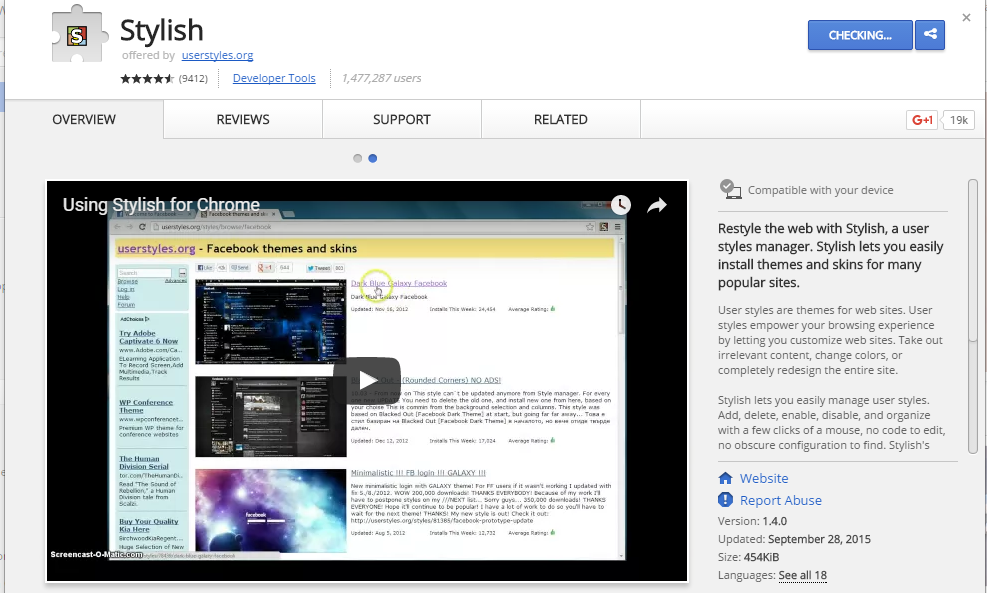
Step 1. Install Stylish for Chrome from the Chrome Web Store. It will take hardly a minute to get installed in your Chrome browser.
Change Facebook Theme Using Chrome Extension
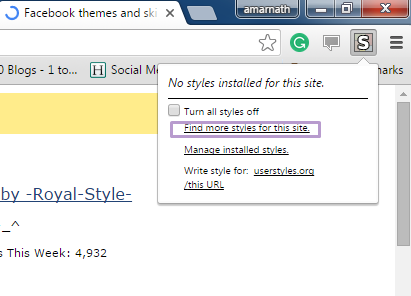
Step 2. Navigate to Facebook.com and click on the S button. Click on Find Styles for this Site to open a new tab with free themes to use for Facebook. Most of the themes are free and attractive too you can easily browse over the full website to discover your favorite theme.
Change Facebook Theme Using Chrome Extension
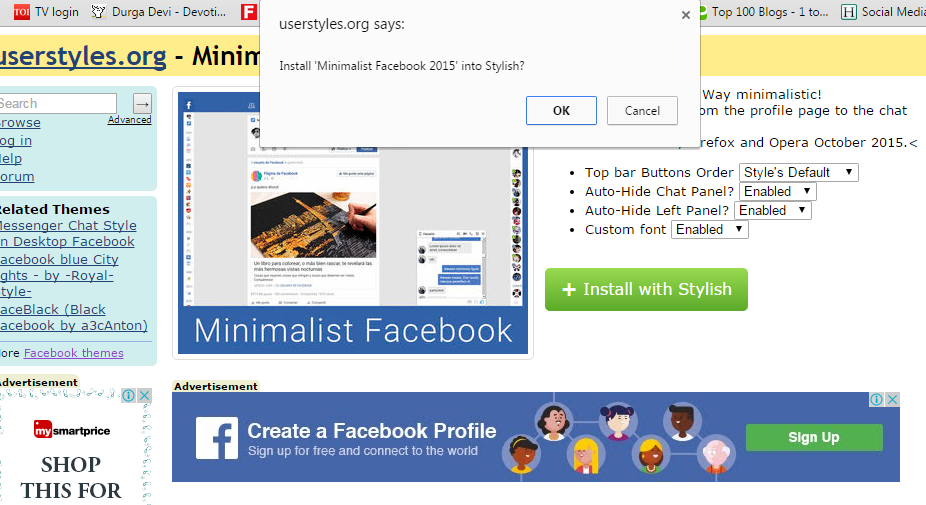
Step 3. Now You will be redirected towards https://userstyles.org Guess what! This site contains huge numbers of Facebook themes, One thing is for sure that you will be confused in-between what to select and which one to skip. Select any them and click on it. Now you will be given a full preview of your selected theme.
Change Facebook Theme Using Chrome Extension
Step 4. If everything is fine in the previewed theme, click on Install with Stylish button at the top right corner of the page. It will take few seconds or minutes depends on your theme size to be installed in Stylish Extension, once installed you will be notified with a success message.
Change Facebook Theme Using Chrome Extension
Step 5. Now whenever you open Facebook, it will show the theme that you have installed with Stylish instead of the boring old blue theme.
Change Facebook Theme Using Chrome Extension
More info

  1. Pentest Example Report
  2. Hacking Wifi
  3. Pentest Wiki
  4. Hacking Jailbreak
  5. Pentest Smtp
  6. Pentest App
  7. Hacking The System
  8. Pentest Reporting Tool
  9. Pentest +
  10. Pentest Smtp
  11. Pentest Keys
  12. Pentesting And Ethical Hacking
  13. Pentest Azure
  14. Hacking Network
  15. Hacking To The Gate
  16. Hacking Linux
  17. Pentest Vpn
  18. Pentest Dns

Wafw00F: The Web Application Firewall Fingerprinting Tool

How does wafw00f work?
   To do its magic, WAFW00F does the following steps:
  • Sends a normal HTTP request and analyses the response; this identifies a number of WAF solutions.
  • If that is not successful, wafw00f sends a number of (potentially malicious) HTTP requests and uses simple logic to deduce which WAF it is.
  • If that is also not successful, wafw00f analyses the responses previously returned and uses another simple algorithm to guess if a WAF or security solution is actively responding to wafw00f's attacks.

   For further details, check out the source code on EnableSecurity's main repository.

What does it detect? WAFW00F can detect a number of firewalls, a list of which is as below:

wafw00f's installation
   If you're using Debian-based distro, enter this commands to install wafw00f: sudo apt update && sudo apt install wafw00f

   But if you're using another Linux distro, enter these commands to install wafw00f:

How to use wafw00f?
   The basic usage is to pass an URL as an argument. Example:

Final Words to you
   Questions? Pull up an issue on GitHub Issue Tracker or contact to EnableSecurity.
   Pull requests, ideas and issues are highly welcome. If you wish to see how WAFW00F is being developed, check out the development board.

   Some useful links:

   Presently being developed and maintained by:

Continue reading

  1. Hacking Books
  2. Hacker Website
  3. Hacking Tutorials
  4. Hacker Keyboard
  5. Hacker On Computer
  6. Pentest Practice
  7. Hacking The System
  8. Hacking With Raspberry Pi
  9. Pentesterlab
  10. Pentest Tools Free
  11. Hacking Meaning
  12. How To Pentest A Network
  13. Hacker Prank
  14. Hacking Bluetooth
  15. Pentest Vs Ethical Hacking
  16. Hackintosh
  17. How To Pentest A Website
  18. Pentestlab
  19. Hacking The Art Of Exploitation
  20. Hacking Page

Mythbusters: Is An Open (Unencrypted) WiFi More Dangerous Than A WPA2-PSK? Actually, It Is Not.

Introduction


Whenever security professionals recommend the 5 most important IT security practices to average users, one of the items is usually something like: "Avoid using open Wifi" or "Always use VPN while using open WiFi" or "Avoid sensitive websites (e.g. online banking) while using open WiFI", etc.

What I think about this? It is bullshit. But let's not jump to the conclusions. Let's analyze all risks and factors here.


During the following analysis, I made two assumptions. The first one is that we are comparing public WiFi hotspots with no encryption at all (referred to as Open), and we compare this to public WiFi hotspots with WPA2-PSK (and just hope WEP died years before). The other assumption is there are people who are security-aware, and those who just don't care. They just want to browse the web, access Facebook, write e-mails, etc.

The risks


Let's discuss the different threats people face using public hotspots, compared to home/work internet usage:
1. Where the website session data is not protected with SSL/TLS (and the cookie is not protected with secure flag), attackers on the same hotspot can obtain the session data and use it in session/login credentials stealing. Typical protocols affected:

  • HTTP sites
  • HTTPS sites but unsecured cookie
  • FTP without encryption
  • IMAP/SMTP/POP3 without SSL/TLS or STARTTLS

2. Attackers can inject extra data into the HTTP traffic, which can be used for exploits, or social engineer attacks (e.g. update Flash player with our malware) – see the Dark Hotel campaign

3. Attackers can use tools like SSLStrip to keep the user's traffic on clear text HTTP and steal password/session data/personal information

4. Attackers can monitor and track user activity

5. Attackers can directly attack the user's machine (e.g. SMB service)

WPA2-PSK security


So, why is a public WPA2-PSK WiFi safer than an open WiFi? Spoiler alert: it is not!

In a generic public WPA2-PSK scenario, all users share the same password. And guess what, the whole traffic can be decrypted with the following information: SSID + shared password + information from the 4-way handshake. https://wiki.wireshark.org/HowToDecrypt802.11
If you want to see it in action, here is a nice tutorial for you
Decrypted WPA2-PSK traffic

Any user having access to the same WPA2-PSK network knows this information. So they can instantly decrypt your traffic. Or the attackers can just set up an access point with the same SSID, same password, and stronger signal. And now, the attacker can instantly launch active man-in-the-middle attacks. It is a common belief (even among ITSEC experts) that WPA2-PSK is not vulnerable to this attack. I am not sure why this vulnerability was left in the protocol, if you have the answer, let me know. Edit (2015-08-03): I think the key message here is that without server authentication (e.g. via PKI), it is not possible to solve this.
Let me link here one of my previous posts here with a great skiddie tool:

To sum up, attackers on a WPA2-PSK network can:

  • Decrypt all HTTP/FTP/IMAP/SMTP/POP3 passwords or other sensitive information
  • Can launch active attacks like SSLStrip, or modify HTTP traffic to include exploit/social engineer attacks
  • Can monitor/track user activity

The only difference between open and WPA2-PSK networks is that an open network can be hacked with an attacker of the skill level of 1 from 10, while the WPA2-PSK network needs and an attacker with a skill level of 1.5. That is the difference.

The real solutions


1. Website owners, service providers should deploy proper (trusted) SSL/TLS infrastructure, protect session cookies, etc. Whenever a user (or security professional) notices a problem with the quality of the service (e.g. missing SSL/TLS), the service provider has to be notified. If no change is made, it is recommended to drop the service provider and choose a more secure one. Users have to use HTTPS Everywhere plugin.

2. Protect the device against exploits by patching the software on it, use a secure browser (Chrome, IE11 + enhanced protection), disable unnecessary plugins (Java, Flash, Silverlight), or at least use it via click-to-play. Also, the use of exploit mitigations tools (EMET, HitmanPro Alert, Malwarebytes AntiExploit) and a good internet security suite is a good idea.

3. Website owners have to deploy HSTS, and optionally include their site in an HSTS preload list

4. Don't click blindly on fake downloads (like fake Flash Player updates)


5. The benefits of a VPN is usually overestimated. A VPN provider is just another provider, like the hotspot provider, or the ISP. They can do the same malicious stuff (traffic injecting, traffic monitoring, user tracking). Especially when people use free VPNs. And "Average Joe" will choose a free VPN. Also, VPN connections tend to be disconnected, and almost none of the VPN providers provide fail secure VPNs. Also, for the price of a good VPN service you can buy a good data plan and use 4G/3G instead of low-quality public hotspots. But besides this, on mobile OSes (Android, iOS, etc.) I strongly recommend the use of VPN, because it is not practically feasible to know for users which app is using SSL/TLS and which is not.

6. Use a location-aware firewall, and whenever the network is not trusted, set it to a Public.

7. In a small-business/home environment, buy a WiFi router with guest WiFi access possibility, where the different passwords can be set to guest networks than used for the other.

Asking the question "Are you using open WiFi?", or "Do you do online banking on open WiFi?" are the wrong questions. The good questions are:
  • Do you trust the operator(s) of the network you are using?
  • Are the clients separated?
  • If clients are not separated, is it possible that there are people with malicious intent on the network?
  • Are you security-aware, and are you following the rules previously mentioned? If you do follow these rules, those will protect you on whatever network you are.

And call me an idiot, but I do online banking, e-shopping, and all the other sensitive stuff while I'm using open WiFi. And whenever I order pizza from an HTTP website, attackers can learn my address. Which is already in the phone book, on Facebook, and in every photo metadata I took with my smartphone about my cat and uploaded to the Internet (http://iknowwhereyourcatlives.com/).


Most articles and research publications are full of FUD about what people can learn from others. Maybe they are just outdated, maybe they are not. But it is totally safe to use Gmail on an open WiFi, no one will be able to read my e-mails.

PS: I know "Average Joe" won't find my blog post, won't start to read it, won't understand half I wrote. But even if they do, they won't patch their browser plugins, pay for a VPN, or check the session cookie. So they are doomed to fail. That's life. Deal with it.

More information